

4L Single-Bowl Smart Pet Feeder | With Camera
Brand: Yuli Youchong
Storage Capacity: 4,000 ml
Dinner Plate: Single-Plate Individual Servings
Suitable for pets: For Cats and Dogs
Material: Food-contact-grade material, safe and non-toxic
This smart automatic pet feeder is suitable for cats and small dogs. It connects to a mobile app via Wi-Fi, enabling remote control and scheduled automatic feeding. Equipped with a large-capacity transparent food container, it features functions such as feeding history tracking and low-food alerts, helping pet owners manage their pets’ diets scientifically and solving the problem of feeding pets when traveling, working late, or away from home. The unit has a minimalist design, is easy to install and clean, and is well-suited for everyday home use.
- Product Details
- Instructions for Use
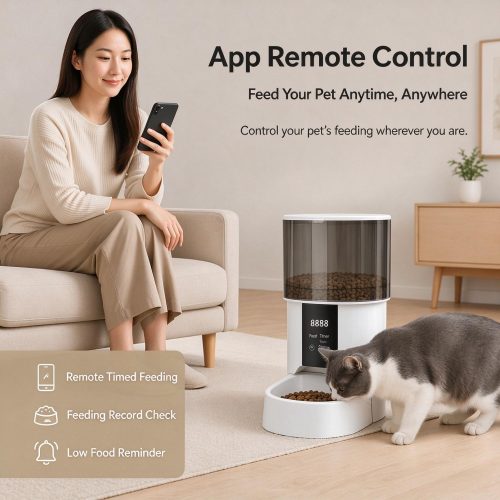
- Remote control via the app—feed your pet anytime, anywhere Once the device is connected to the app, you can manually dispense food remotely with a single tap. It supports customizing multiple scheduled feeding plans, allowing you to freely set the number of daily feedings, feeding times, and the amount of food dispensed per feeding. It ensures your pet is fed on time even when you’re away, helping them establish stable and regular eating habits.
- View Feeding Records The app automatically records every feeding session, allowing you to view past feeding times and portion sizes at any time. This makes it easy to track your pet’s feeding frequency and scientifically monitor its dietary habits.
- Low Food Supply Alert Real-time monitoring of the remaining food in the food storage bin; when food levels are low, the app sends a push notification reminding users to restock in a timely manner to prevent their pets from running out of food.
- Large-Capacity Transparent, Airtight Grain Storage Container Transparent grain storage bins allow for a clear view of the remaining grain; the sealed bin design keeps out moisture and dust, effectively preventing dry grain from becoming damp, clumping, or molding, and preserving the grain’s natural aroma for the long term.
- Low-Noise Grain Discharge Design to Prevent Jamming The optimized feed chute reduces the likelihood of food jams; the motor operates quietly, so it won’t startle timid pets. The food bowl is removable and can be rinsed with water, making cleaning simple and convenient.
- Minimalist Body Design With its pure white, minimalist design, it looks great in both the living room and bedroom and complements a variety of home decor styles.
I. Product Introduction
This smart pet feeder is designed specifically for cats and small dogs. It supports remote control via a mobile app, scheduled automatic feeding, and one-touch manual dispensing. The large-capacity, airtight food compartment keeps food fresh and protects it from moisture. It’s easy to operate and clean, solving the problem of who will feed your pet when you’re at work, on a business trip, or away from home.
II. Unboxing and Accessories
Automatic Feeder Unit, Power Adapter, Removable Food Bowl, Instruction Manual
III. Installation Steps
-
Place the machine onLevel, dry, and stableon a level surface, away from slopes, dampness, and direct sunlight.
-
Align the food bowl with the slot on the unit and snap it into place, ensuring it fits securely and does not wobble.
-
When you plug in the dedicated power adapter, the device enters standby mode.
-
Open the top lid and pour inDried Granulated Pet Food, then simply close the lid.
IV. Mobile Phone Network Setup Guide
-
Download the corresponding mobile app, register, and log in.
-
On the app's home screen, tap [Add Device] and select "Pet Feeder."
-
Press and hold the device button until the indicator light flashes to enter pairing mode.
-
Enter your home Wi-Fi password (we recommend using the 2.4 GHz network, as it is more stable).
-
Wait for the connection to be established and the binding to be completed, and you'll be able to use all features remotely.
V. How to Use the Features
1. Remote Manual Feeding
Open the mobile app anytime, anywhere, and tap [Feed] to dispense food with a single tap—it’s very convenient for giving your pet an extra meal or topping up their food.
2. Scheduled Automatic Feeding
You can freely set the following within the app: feeding times, number of daily feedings, and portion size per feeding. Once the settings are saved, the machine will automatically dispense food at the scheduled times each day, helping your pet maintain a regular eating schedule so they won’t go hungry or overeat.
3. Visual Display of Remaining Grain + Low-Stock Alerts
The transparent grain silo allows you to see the remaining grain at a glance; when grain levels are low, the app will send a notification so you can restock in a timely manner and avoid running out of grain.
4. View Feeding Records
The app automatically saves a record of every feeding, allowing you to check feeding times and food dispensing details at any time and stay on top of your pet's dietary habits.
VI. Cleaning and Maintenance
-
Before CleaningThe power must be turned off., Do not submerge the entire unit in water or expose it to water.
-
The food bowl can be removed separately; simply rinse it with water and wipe it dry to ensure it’s clean and residue-free.
-
Wipe away grain residue from the inside of the grain silo regularly to keep it dry and prevent moisture and mold.
-
Wipe down the exterior of the unit with a dry cloth.
VII. Important Notes
-
Supports onlyDried Granulated Rations, Do not feed wet food, canned food, powdered food, or treats to prevent the machine from jamming or food from molding.
-
Do not reach toward the grain outlet while the equipment is in operation to prevent your hand from getting caught.
-
Do not allow pets to chew on power cords to prevent damage to the equipment.
-
Do not disassemble or modify the device on your own; otherwise, the warranty will be void.
-
If the product will not be used for an extended period, please empty the food, unplug it, and store it in a dry, well-ventilated place.
VIII. Troubleshooting Common Issues
-
Network Configuration Failed: Use 2.4 GHz Wi-Fi, verify the password, restart the device, and try again.
-
No Grain Dispensed / Grain Jam: Turn off the power and remove any clumped grain and residue from the discharge chute.
-
Device Offline: Check that the power cord is plugged in securely and that the Wi-Fi signal is working properly.
-
No Food Shortage Alerts: Check whether notification permissions for the mobile app are enabled.



 简体中文
简体中文  English