
Youle Smart Bird Feeder | With Camera
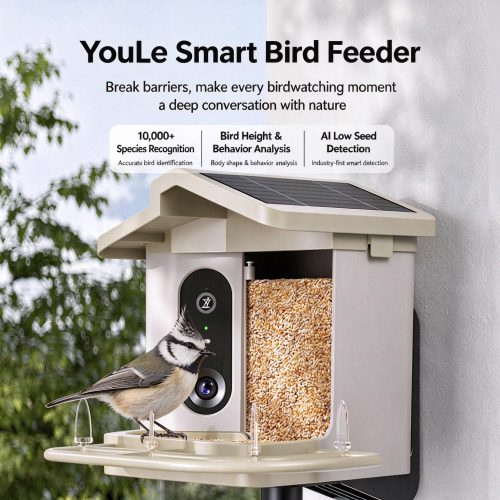
This smart bird feeder is a solar-powered outdoor bird-feeding device equipped with an AI camera. Install it in your yard, on your balcony, or in your garden to attract wild birds to feed. It automatically captures images of the birds, uses AI to identify their species, and lets you enjoy an immersive bird-watching experience without leaving home. Powered by solar energy, it requires no frequent recharging and is suitable for long-term outdoor use, making it a great choice for nature lovers and birdwatchers.
- Product Details
- Instructions for Use
- AI Bird Recognition, supporting the identification of tens of thousands of bird species Equipped with a built-in AI image recognition algorithm, it can accurately identify over 10,000 bird species. When birds visit the feeder, it automatically identifies their species, and the app records the bird’s information, making it easy for you to learn about different wild birds.
- Body Measurements and Behavioral Analysis of Small Birds It automatically measures birds' heights, records data on their behaviors—such as feeding and perching—and analyzes their activity patterns, transforming birdwatching from simply observing to truly understanding bird behavior.
- AI Food Shortage Detection Alerts An industry-first AI-powered grain shortage detection feature. The camera automatically monitors the remaining feed level in the grain bin, and when grain levels are low, the mobile app sends a notification, allowing you to refill the bird feed promptly without having to climb up and open the bin frequently to check.
- Solar-powered, no wiring required for outdoor use Solar panels are mounted on top of the device, which absorb sunlight during the day to charge the built-in battery, ensuring long-lasting power. When installed outdoors, it does not require a connection to the mains, offering flexible installation options—it can be mounted on patios, tree trunks, or exterior walls.
- High-definition camera, automatic photo and video capture When a bird lands on the feeding platform, the device’s sensors are triggered, automatically taking photos and recording videos. You can view the live feed remotely via the mobile app and rewatch the bird’s feeding moments anytime.
- Large-capacity grain storage silo, rainproof and dustproof The feeder has a large capacity, so a single refill can sustain feeding for an extended period; the entire unit features a rainproof housing, making it suitable for outdoor use. Rainwater is unlikely to enter the hopper, so the birdseed is less likely to become damp or moldy.
- Secure Feeding Platform Wider, non-slip feeding platform with transparent guide rails, making it easy for small birds to perch and eat; the structure is sturdy and resistant to tipping.
I. Product Overview
The YouLe Smart Bird Feeder is a solar-powered outdoor bird-watching device equipped with an AI-powered smart camera. The device automatically identifies visiting birds and captures footage of them feeding, allowing for an immersive bird-watching experience from the comfort of your home. Featuring a solar-powered design that requires no external power source, its waterproof housing makes it suitable for outdoor settings such as yards, balconies, and gardens, making it an ideal device for birdwatchers and families seeking hands-on nature education.
II. List of Parts
- Smart Bird Feeder Unit ×1
- Mounting Bracket / Screw Kit ×1
- User Manual ×1
III. Installation Steps
- Select an installation location Choose a location with plenty of sunlight, an unobstructed view, and away from natural predators such as cats and dogs; it can be mounted on a wall or on a pole. Avoid areas prone to water accumulation or exposed to strong winds.
- Equipment Mounting Use the included screws and brackets to securely mount the equipment to the wall or upright post, ensuring that the entire unit does not wobble or fall.
- Add birdseed Open the grain silo door and pour inDried Granulated Bird Seed(Millet, sunflower seeds, or mixed birdseed with shells are all acceptable.) Close the hopper door securely to ensure the hopper is sealed and protected from rain.
- Pre-Startup Preparations The solar panel on top of the device absorbs sunlight to automatically charge the built-in lithium battery; if the battery is low when using the device for the first time, you can fully charge it before installation.
IV. App Network Configuration Procedures
- Download the companion smart app, then register and log in to your account.
- On the app's home screen, tap [Add Device] and select the YouLe Smart Bird Feeder.
- Press and hold the device's function button until the indicator light flashes to enter network pairing mode.
- Enter your Wi-Fi username and password (using 2.4 GHz Wi-Fi), and follow the app's instructions to complete the network connection and pairing.
- Once the network connection is established, you can view live footage, photo and video recordings, and bird identification information in the app.
V. Instructions for Using the Features
- AI Bird Recognition When a bird lands on the feeding platform, the camera automatically takes a photo. An AI algorithm identifies the bird species—supporting recognition of over 10,000 species—and the identification results are automatically saved in the app's log.
- Bird Body Measurements & Behavioral Analysis It automatically measures the height of visiting birds and records behavioral data such as perching and feeding, helping to understand bird activity patterns.
- AI Food Shortage Detection Alerts AI cameras automatically detect the remaining grain in the silo. When grain levels are low, the mobile app sends a low-grain alert, making it easy to restock in a timely manner.
- Motion Detection Snapshots and Video Recording When a bird visits, the camera automatically takes photos and records videos. You can preview the footage in real time in the app and review the bird footage at any time.
- Solar-Powered Self-Sufficiency The solar panel on top absorbs sunlight during the day to recharge the built-in battery, reducing the need for frequent charging and making it ideal for long-term outdoor use.
VI. Cleaning and Maintenance
- Clean the feeding stations regularly: Remove leftover food scraps and bird droppings to keep the platform clean and prevent the growth of bacteria.
- Feeder Maintenance: Empty the feeder regularly, wipe down the inside, and replace the birdseed with fresh seed to prevent the seed from becoming damp, moldy, or infested with insects.
- Solar Panel Maintenance: Wipe dust off the surface of the solar panels regularly to ensure optimal light intake and charging efficiency.
- Extreme Weather Inspection: After heavy rain or strong winds, check that equipment is securely fastened and that waterproof seals are intact.
VII. Important Notes
- Advertising OnlyDried Granulated Bird Seed, Do not feed perishable foods such as fruit, wet food, and meat to prevent mold growth and insect infestations.
- The device is waterproof for outdoor use, but it should not be left submerged in standing water for extended periods.
- Install the device in a location with ample sunlight whenever possible; during prolonged periods of continuous rain, you may remove the device in advance to charge it and keep it on standby.
- Please observe birds responsibly; do not deliberately chase or disturb wild birds.
- Do not disassemble the device on your own. Disassembly will damage the waterproof seal and void the warranty.
- Do not install the device in high-risk locations where children can easily reach it, to prevent it from falling.
VIII. Simple Troubleshooting
- Network Configuration Failed: Make sure you're using 2.4 GHz Wi-Fi, verify the Wi-Fi password, restart your device and router, and try again.
- Unable to capture / recognize: Check that the device has sufficient battery power; make sure the camera lens is free of smudges or obstructions; verify that the device is online.
- Not Receiving Low-Stock Alerts: Check whether notification permissions are enabled in the mobile app, and make sure the device is connected to the internet.
- Slow Charging: Check the solar panel surface for dust buildup; make sure the installation location receives ample sunlight.
- The device frequently goes offline: Check the Wi-Fi signal strength and minimize obstacles that block the signal.



 简体中文
简体中文  English